0. 시작하는 이유
헤드 퍼스트의 디자인 패턴 책을 보았지만 실제 코드에서 적용하긴 쉽지 않다. 책의 예시가 실무에서 접할 상황이 아니라 객체나라에서 펼쳐지는 피자와 피자매장의 이야기 이기에 내가 진행중인 플젝에서 적용해보려고 한다.
내 프로젝트는 spring boot + jpa 환경이라서 예제 코드도 같은 환경으로 깃허브에 해당 코드를 올려두었다. 상황별로 태그를 달아 두었으니 clone 후 태그를 체크아웃 하면서 설명해보겠다.
https://github.com/SongHae8640/designPatternApply
GitHub - SongHae8640/designPatternApply
Contribute to SongHae8640/designPatternApply development by creating an account on GitHub.
github.com
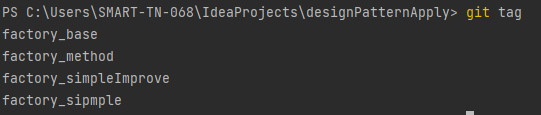
커맨드에서 git fetch origin 이후에 git tag를 입력했을때 아래와 같이 나오면 준비 끝이다.
1. 상황
상황은 다음과 같다. 게시글 도메인과 음료 도메인이 있고 이 두 도메인에 댓글을 달 수 있다.
댓글을 조회할때는
1. 해당 타입의 도메인이 있는지 여부를 확인한다.
2. 해당 타입의 도메인의 댓글수 를 +1 해준다.
3. 댓글의 타입과 해당 타입의 id를 를 댓글 내용과 함께 저장한다.
git checkout tags/factory_base 명령어를 입력해서 코드로 함께 봐보자.
엔티티 코드이다.
@Entity
@Table(name = "drink")
@Getter
@NoArgsConstructor(access = AccessLevel.PROTECTED)
@AllArgsConstructor
@Builder
@ToString
public class Drink {

    @Id
    @Column(name = "id")
    @GeneratedValue(strategy = GenerationType.SEQUENCE
            , generator = "DRINK_SEQ_GEN")
    @SequenceGenerator(name = "DRINK_SEQ_GEN",
            sequenceName = "DRINK_SEQ",
            allocationSize = 1)
    private Long id;

    @Column(name = "name", nullable = false)
    private String name;


    @Column(name = "description")
    private String description;

    @Column(name = "comment_count", nullable = false)
    private Long commentCount;

    @PrePersist
    public void prePersist(){
        this.commentCount = 0L;
    }

    public void addCommentCount() {
        this.commentCount++;
    }
}


@Entity
@Table(name = "board")
@Getter
@NoArgsConstructor(access = AccessLevel.PROTECTED)
@AllArgsConstructor
@Builder
@ToString
public class Board {

    @Id
    @GeneratedValue(strategy = GenerationType.SEQUENCE
            , generator = "DISCOVER_SEQ_GEN")
    @SequenceGenerator(name = "DISCOVER_SEQ_GEN",
            sequenceName = "DISCOVER_SEQ",
            allocationSize = 1)
    private Long id;

    @Column(name = "title", nullable = false)
    private String title;

    @Column(name = "content", nullable = false)
    private String content;

    @Column(name = "comment_count", nullable = false)
    private Long commentCount;

    @PrePersist
    public void prePersist(){
        this.commentCount = 0L;
    }

    public void addCommentCount() {
        this.commentCount++;
    }
}


@Entity
@Table(name = "comment")
@Getter
@NoArgsConstructor(access = AccessLevel.PROTECTED)
@AllArgsConstructor
@ToString
@Builder
public class Comment{

    @Id
    @Column(name = "id")
    @GeneratedValue(strategy = GenerationType.SEQUENCE
            , generator = "COMMENT_SEQ_GEN")
    @SequenceGenerator(name = "COMMENT_SEQ_GEN",
            sequenceName = "COMMENT_SEQ",
            allocationSize = 1)
    private Long id;

    @Column(name = "comment_type")
    @Enumerated(EnumType.STRING)
    private CommentType commentType;

    @Column(name = "types_id", nullable = false)
    private Long typesId;

    @Column(name = "writer_name", nullable = false)
    private String writerName;

    @Column(name = "password", nullable = false)
    private String password;

    @Column(name = "content", nullable = false)
    private String content;
}
Service 코드이다. 조회 및 저장할때 비슷하게 반복되는 코드가 보일것이다.
@Service
@RequiredArgsConstructor
public class CommentService {

    private final CommentRepository commentRepository;
    private final DrinkRepository drinkRepository;
    private final BoardRepository boardRepository;


    public List<Comment> getCommentList(CommentType commentType, Long typesId) {
        if(commentType == CommentType.DRINK) {
            drinkRepository.findById(typesId)
                    .orElseThrow(() -> new NoSuchElementException("존재하지 않는 음료입니다."));
        } else if(commentType == CommentType.BOARD) {
            boardRepository.findById(typesId)
                    .orElseThrow(() -> new NoSuchElementException("존재하지 않는 게시글입니다."));
        }
        return commentRepository.findAllByCommentTypeAndTypesId(commentType, typesId);
    }

    public Comment saveComment(Comment comment) {
        if(comment.getCommentType() == CommentType.DRINK) {
            drinkRepository.findById(comment.getTypesId())
                    .orElseThrow(() -> new NoSuchElementException("존재하지 않는 음료입니다."))
                    .addCommentCount();
        } else if(comment.getCommentType() == CommentType.BOARD) {
            boardRepository.findById(comment.getTypesId())
                    .orElseThrow(() -> new NoSuchElementException("존재하지 않는 게시글입니다."))
                    .addCommentCount();
        }
        return commentRepository.save(comment);
    }
}
2. 테스트
위 코드에서는 엔티티와 Serivce 만 있지만 Controller 로 외부 요청을 받는 API를 구성하였다. (깃헙 코드 참조)
이 API가 정상적으로 작동하는지를 확인 하는 테스트 코드를 작성하고 각 변화에서 응답이 같은지를 확인하려고 한다.
@SpringBootTest
@AutoConfigureMockMvc
class CommentControllerTest {

    @Autowired
    MockMvc mockMvc;

    @Autowired
    CommentRepository commentRepository;
    @Autowired
    BoardRepository boardRepository;
    @Autowired
    DrinkRepository drinkRepository;

    Long savedBoardId;
    Long savedDrinkId;


    @BeforeEach
    void setUp() {
        Board board = boardRepository.save(Board.builder()
                .title("제목")
                .content("내용")
                .build());
        savedBoardId = board.getId();

        Drink drink = drinkRepository.save(Drink.builder()
                .name("코카콜라")
                .description("코카콜라는 맛있다.")
                .build());
        savedDrinkId = drink.getId();

        commentRepository.save(Comment.builder()
                .content("댓글")
                .writerName("tester")
                .password("1234")
                .commentType(CommentType.BOARD)
                .typesId(savedBoardId)
                .build());

        commentRepository.save(Comment.builder()
                .content("댓글")
                .writerName("tester")
                .password("1234")
                .commentType(CommentType.DRINK)
                .typesId(savedDrinkId)
                .build());
    }

    @Test
    void 음료_댓글_기본_조회() throws Exception {
        // Given
        String commentType = "drink";
        long typesId = 1L;
        String url = "/api/comments?commentType=" + commentType + "&typesId=" + typesId;

        // When
        ResultActions actions = mockMvc.perform(get(url)

        );


        // Then
        System.out.println("------------------");
        actions.andExpect(status().isOk());
        System.out.println(actions.andReturn().getResponse().getContentAsString());

    }

    @Test
    void 음료_댓글_기본_저장() throws Exception {
        // Given
        String url = "/api/comments";
        String commentType = "drink";
        Long typesId = 1L;
        CommentDto commentDto = new  CommentDto();
        commentDto.setCommentType(commentType);
        commentDto.setTypesId(typesId);
        commentDto.setWriterName("테스터");
        commentDto.setContent("테스트 코멘트");
        commentDto.setPassword("1234");


        // When
        ResultActions actions = mockMvc.perform(post(url)
                .content(new ObjectMapper().writeValueAsString(commentDto))
                .contentType(MediaType.APPLICATION_JSON)
        );


        // Then
        System.out.println("------------------");
        actions.andExpect(status().isOk())
                .andExpect(jsonPath("$.content").value(commentDto.getContent()))
                .andExpect(jsonPath("$.writerName").value(commentDto.getWriterName()))
                .andExpect(result -> {
                    System.out.println("status :: " + result.getResponse().getStatus());
                    System.out.println("body :: " + result.getResponse().getContentAsString());
                });
        assertEquals(1 , drinkRepository.findById(typesId).get().getCommentCount());
    }
}
테스트 결과는 아래 사진 처럼 정상이다.

3. 문제점
게시글과 음료 외에 댓글 타입이 추가가 된다면 Service 코드에 if 절이 추가 해야하기 때문에 OCP를 위배하게 된다.
또한, findById 를 통해 객체의 생성하는 부분과 댓글 수를 더하는 로직이 한 클래스 내에 있어 SRP 를 위배하고 있다.
때문에 조건으로 분기하는 부분을 팩토리를 이용하여 이 코드를 개선해보려고 한다.
2번째 포스팅에서는 simple factory 를 이용하여 리펙토링 해보고, 3번째 포스팅에서는 factory method pattern 을 이용하여 리펙토링 해보겠다.
'개발' 카테고리의 다른 글
| 디자인 패턴을 적용해보자 - 팩토리(3). (pizza 예제 아님) (0) | 2023.04.05 |
|---|---|
| 디자인 패턴을 적용해보자 - 팩토리(2). (pizza 예제 아님) (0) | 2023.04.05 |
| JAVA HashMap의 용량은 왜 2의 거듭제곱일까? - 자료구조(9) (0) | 2022.05.30 |
| JAVA HashMap 과 HashSet의 성능 비교 - 자료구조(8) (0) | 2022.05.30 |
| JAVA Hash 그리고 HashMap 과 HashTable - 자료구조(7) (0) | 2022.05.30 |

